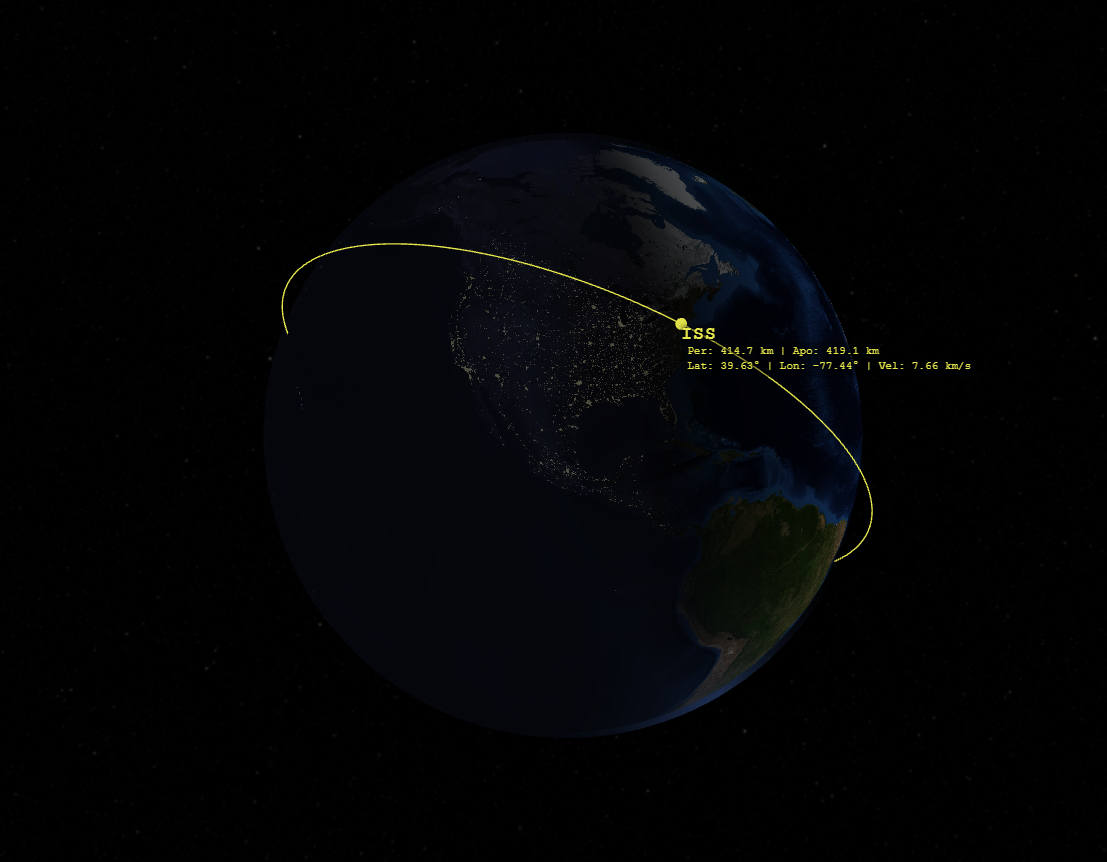
Verified SGP4/SDP4 Propagation
Two-line element sets encode mean elements that are only physically meaningful inside the SGP4 analytical model. Until now, the Orbit Visualizer converted TLEs to osculating elements and propagated them as ideal two-body orbits — fine for teaching geometry, but wrong for real satellites. Version 1.1.0 ships a complete in-house implementation of SGP4, including the SDP4 deep-space branch used by GEO, GPS-class, and Molniya-class orbits, based on the published algorithm of Vallado, Crawford, Hujsak & Kelso (Revisiting Spacetrack Report #3, AIAA 2006-6753).
Every object now carries an explicit propagator selection: SGP4 (recommended for TLEs), J2 secular (adds Earth-oblateness drift of the ascending node and argument of perigee — the reason sun-synchronous orbits work), or two-body (ideal Keplerian motion for teaching and quick sketches). Each option is labeled plainly, and every analysis output is stamped with the model that produced it. Choosing your propagator — and knowing its limits — is how professional tools work.
Maneuver Planning
Every scenario object now has an Add Maneuver panel. Pick a maneuver type from the dropdown, set when it fires, and the form fills in the relevant parameters. Each node shows a live ΔV readout before you commit, and the trajectory re-propagates downstream with a running total-ΔV budget per object.
- Manual burn — Specify components directly in radial / in-track / cross-track or inertial (J2000) coordinates, with a magnitude field that rescales them.
- Hohmann transfer — The classic two-burn altitude change, sized for you. Works from any circular starting orbit.
- Circularization burn — A single in-track burn at apoapsis or periapsis to round out an elliptical orbit.
- Plane change — Adjust inclination with a choice of when to execute: immediately, at the nodal crossing (minimum ΔV for circular orbits), or at the point of maximum cross-track offset.
- Lambert transfer — An iterative solver finds the departure and (optionally) arrival burns to reach any other object in your scene within a chosen time of flight. Add an RIC-frame aim offset to set up approaches and standoff points. The solver surfaces clear, friendly error messages when geometry is singular or a solution doesn’t converge — no cryptic failures.
One important note on SGP4 objects: because SGP4 propagates mean elements, post-burn arcs on TLE-based objects hand off to the J2 model from the osculating post-burn state. The app labels this on the maneuver node so the behavior is never a surprise.
The Analysis Panel
A new collapsible panel beneath the 3D view hosts three tools mission planners reach for most:
Ground Tracks
Subsatellite tracks for any scenario object on an equirectangular world map, with a live position marker synced to the simulation clock and per-object colors matching the 3D scene. Under SGP4 or J2 you can observe a real phenomenon pure two-body models can’t show: the orbital plane regressing day by day as Earth’s oblateness pulls it westward. Save the map as a PNG at any time.
Ground Sites & Pass Prediction
Define ground stations by latitude, longitude, altitude, and elevation mask, then compute pass tables — AOS, LOS, duration, maximum elevation, and azimuths — for any object over spans from 6 hours to 14 days. This answers the question visualization alone never could: when can my site actually see this satellite? Tables download as CSV for further analysis.
Conjunction Screening
Pick any two scenario objects and screen for close approaches: a range-vs-time chart with hover readout, a table of closest-approach events with time of closest approach, miss distance, and relative speed, and a radial / in-track / cross-track relative-motion view — the frame proximity-operations analysts actually think in. Mixed-propagator pairs are handled in a consistent inertial frame.
Load from Catalog
No more hunting for TLEs. The new Load from Catalog button, refreshed daily from the ExoAtlas data pipeline, one-click loads featured objects — the ISS, Hubble, Landsat 9, GOES-East, a GPS III vehicle, a Starlink satellite — and whole groups: the operational GPS constellation, a Starlink shell sample, and Iridium NEXT. Every entry shows its TLE epoch age so you know how fresh the elements are. Deep links work too: /orbit-visualizer/?catalog=iss opens the app with the ISS already loaded and propagating under SGP4.
Export and Share
Scenario links: the Copy Link button serializes your entire scenario — every object, propagator choice, maneuver, and ground site — into a single shareable URL. Send a link; the recipient gets your exact setup. Scenario save: named local saves for everyone, and cloud scenario storage synced to your account with ExoAtlas Pro.
Exports: CSV ephemerides (free) for any object and span; CCSDS OEM 2.0 files (the interchange standard flight-dynamics tools speak) and CZML for the Cesium ecosystem (Pro); and one-click PNG capture of both the 3D scene and the ground-track map. Every export is stamped with the propagator and reference frame that produced it — SGP4 states are converted from TEME to the EME2000 frame on export, and the file headers say so.
Free vs. Pro
The rule is simple: exploring is free; deliverables are Pro. SGP4, the propagator selector, ground tracks, access windows (up to 48 hours, one site), conjunction screening, the catalog, permalinks, and PNG capture are all free — verify everything, share anything. ExoAtlas Pro unlocks the analyst tier: 14-day spans, up to ten ground sites, unlimited maneuver nodes, full constellation loads, OEM and CZML export, longer CSV ephemerides, and cloud scenario storage.
Getting Started
Open the Orbit Visualizer, click Load from Catalog, pick the ISS, and open the analysis panel — you’ll have a live SGP4 ground track in under ten seconds. Or paste any current TLE from the TLE Parser and hit Visualize in 3D. To try the maneuver planner, expand any object card and click Add Maneuver; Hohmann and circularization presets fill in the burns for you, so the first run takes about a minute from cold start to a two-burn transfer trajectory.